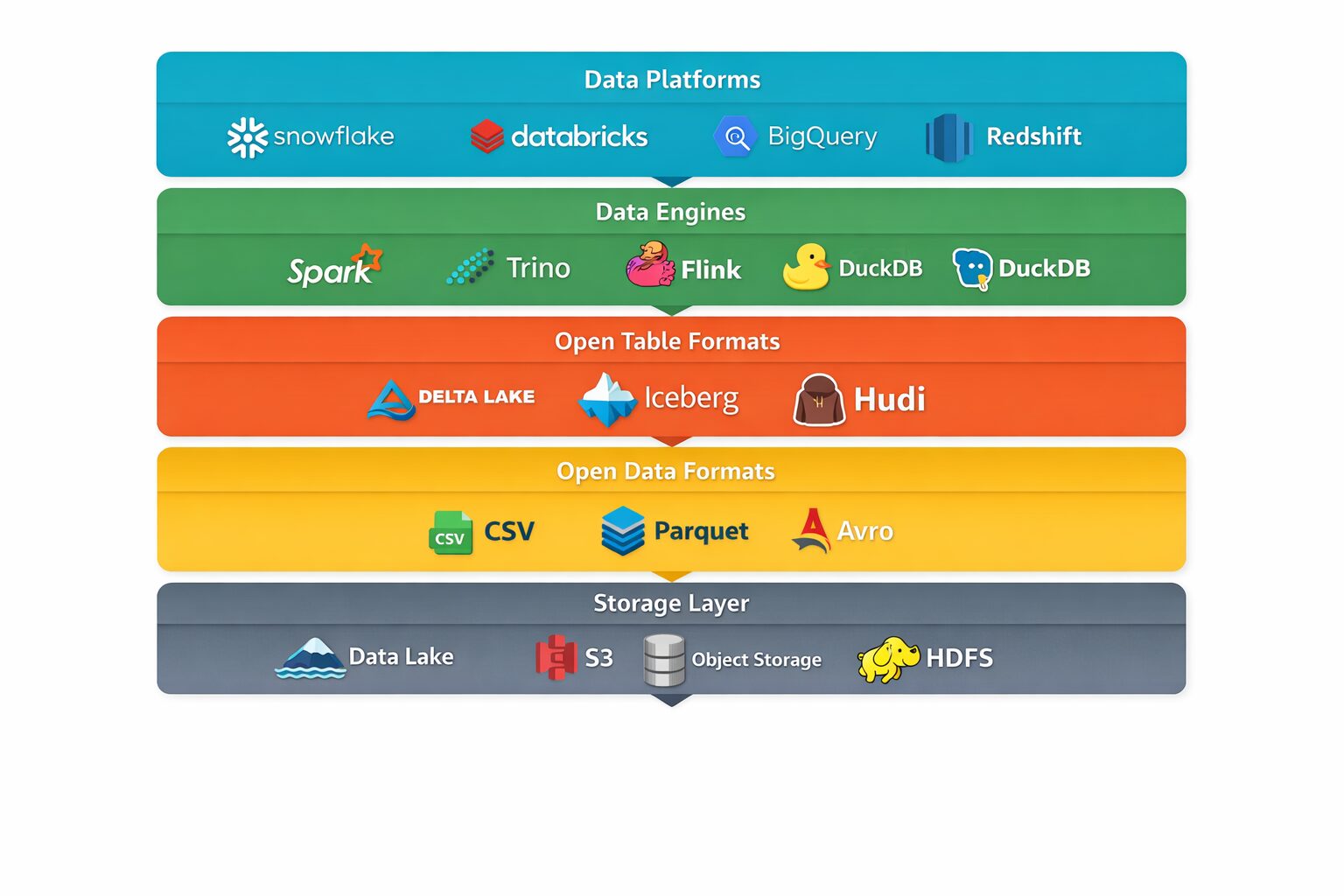
Data conversations today are full of terms like open formats, Delta, Spark, Snowflake, and Parquet.
They sound complex, but the core ideas are actually straightforward once we connect them step by step.
This article walks through the full data chain from raw data to modern data platforms, in a simple, readable flow.
1. What Is an Open Data Format?
At its core, a data format defines how data is stored in a file.
An open data format is a format that:
-
Is publicly documented
-
Can be read and written by many tools
-
Is not controlled by a single vendor
This means your data is portable and future-proof.
Simple example: CSV
A CSV (Comma-Separated Values) file stores data as rows and columns in plain text.
This file can be opened using Excel, Python, Spark, databases, or even a text editor.
That openness is what makes CSV an open data format.
2. Common Open Data Formats and Their Differences
As data grows larger, CSV becomes inefficient. That’s why other open formats exist.
Popular open data formats
| Format | Human Readable | Storage Efficient | Fast for Analytics | Common Usage |
|---|---|---|---|---|
| CSV | ✅ Yes | ❌ No | ❌ No | Small datasets, sharing |
| JSON | ✅ Yes | ❌ No | ❌ No | APIs, logs |
| Parquet | ❌ No | ✅ Yes | ✅ Yes | Analytics, data lakes |
| Avro | ❌ No | ✅ Yes | ✅ Yes | Streaming systems |
| ORC | ❌ No | ✅ Yes | ✅ Yes | Big data analytics |
Among these, Parquet has become the most widely used format for analytics.
Why Parquet Became So Popular
As data volumes increased, CSV and JSON started to struggle.
This led to columnar open formats like Parquet.
Parquet is:
-
Highly compressed
-
Very fast for analytics
-
Designed for large datasets
That’s why almost every modern data lake today uses Parquet.
The Hidden Problems with Open Data Formats (Especially Parquet)
Parquet is excellent at reading data, but it has serious limitations when data changes.
Here are the most common problems teams face.
❌ Problem 1: Updates Are Hard
Parquet files are immutable.
You cannot simply:
-
Update a row
-
Delete a record
-
Modify a value
Instead, you have to rewrite entire files.
This quickly becomes expensive and complex.
❌ Problem 2: No Transaction Support
If two jobs write to the same dataset at the same time:
-
Files can be partially written
-
Data can become inconsistent
-
Readers may see corrupt data
Parquet alone has no concept of transactions.
❌ Problem 3: No Data Versioning or History
Once data is overwritten:
-
The previous version is gone
-
No easy rollback
-
No way to audit what changed and when
For enterprise use cases, this is a big risk.
❌ Problem 4: Schema Changes Are Painful
Changing a column:
-
Adding a column
-
Renaming a column
-
Changing data types
…can break downstream jobs because Parquet itself does not manage schema evolution.
3. What Is an Open Table Format?
Open data formats store files well, but they don’t manage data changes well as you see above.
This is where open table formats come in.
An open table format:
-
Sits on top of open data files (usually Parquet)
-
Treats files as a logical table
-
Manages updates, deletes, and history
Popular open table formats
| Open Table Format | Key Strength |
|---|---|
| Delta Lake | Reliability & ACID transactions |
| Apache Iceberg | Scalability & engine compatibility |
| Apache Hudi | Real-time ingestion |
4. Open Data Format vs Open Table Format
These two concepts are related but not the same.
| Aspect | Open Data Format | Open Table Format |
|---|---|---|
| Level | File | Table |
| Examples | CSV, Parquet | Delta, Iceberg |
| Handles updates | ❌ Poorly | ✅ Well |
| Tracks history | ❌ No | ✅ Yes |
| Dependency | Standalone | Built on open formats |
Key relationship:
Open table formats use open data formats underneath.
For example:
Delta Lake = Parquet files + transaction log + rules
What Open Table Formats Fix
| Problem with Parquet | How Open Table Formats Solve It |
|---|---|
| No updates/deletes | Manage file rewrites automatically |
| No transactions | ACID transactions |
| No history | Time travel & versioning |
| Schema changes risky | Controlled schema evolution |
| Concurrent writes unsafe | Conflict detection |
Key idea:
Parquet stays the storage layer.
Open table formats add order and safety.
Open Data Format vs Open Table Format (Clarified)
| Open Data Format | Open Table Format |
|---|---|
| File-level | Table-level |
| CSV, Parquet | Delta, Iceberg |
| Optimized for storage | Optimized for change |
| No governance | Built-in reliability |
They are not competitors — they are complementary.
5. What Are Data Engines?
A data engine is software that:
-
Reads data
-
Processes it
-
Produces results
Engines do not own the data — they operate on data stored elsewhere.
Common data engines
| Data Engine | Best For | Notes |
|---|---|---|
| Apache Spark | Large-scale batch & streaming | Very flexible |
| Trino / Presto | Fast SQL queries | Interactive analytics |
| Flink | Real-time processing | Event-driven systems |
| Pandas | Small datasets | Single-machine |
Data Engines:
-
Read Parquet
-
Understand open table formats
-
Do not manage storage themselves
6. What Are Data Platforms?
A data platform is a managed environment that combines:
-
Storage
-
Compute
-
Security
-
Governance
-
User access
Platforms may internally use open formats and engines, but they hide complexity.
Popular data platforms
| Platform | Type | Strength |
|---|---|---|
| Snowflake | Cloud data warehouse | Ease of use |
| Databricks | Lakehouse platform | Spark + open formats |
| BigQuery | Cloud-native warehouse | Serverless analytics |
| Redshift | Cloud warehouse | AWS integration |
7. Reading an Open Data Format (CSV) Using Python
CSV is the simplest open data format to work with.
Example: Reading CSV with Python
That’s all it takes.
No proprietary software.
No vendor lock-in.
8. Reading an Open Data Format (Parquet) Using Python
Parquet is more efficient but still open.
Example: Reading Parquet with Python
The experience for the user is almost identical — even though Parquet is far more optimized internally.
9. How Everything Fits Together (One Simple Analogy — Finally 🍽️)
Imagine the entire data ecosystem as a restaurant system:
-
Data → Raw ingredients
-
Open data format → Standard food packaging (rice bags, spice packets)
-
Open table format → Organized storage with labels, expiry tracking
-
Data engine → Kitchen and chefs that cook the food
-
Data platform → The full restaurant (kitchen, seating, billing, staff)
You can:
-
Buy ingredients yourself and hire a chef (open formats + Spark)
-
Or walk into a fully managed restaurant (Snowflake, Databricks)
Both work — the choice depends on control vs convenience and obviously cost.
10. Why You Can’t Update Parquet Directly
Parquet files are immutable.
That means:
-
No row-level updates
-
No deletes
-
No
UPDATEstatement like a database
This is by design — Parquet is optimized for fast reads, not changes.
So Python (or any tool) cannot modify a row inside an existing Parquet file.
The Only Way: Read → Change → Rewrite
This is the standard pattern when using plain Parquet + Python.
Example scenario
You have a Parquet file with restaurant ratings, and you want to update one rating.
Step 1: Read the Parquet file
Step 2: Update the data in memory
Step 3: Write it back (overwrite)
✅ This works
❌ But the entire file is rewritten
11.Why This Becomes a Problem at Scale
This approach is fine for:
-
Small files
-
Experiments
-
One-off jobs
It breaks down when:
-
Files are large (GBs or TBs)
-
Many users write concurrently
-
You need audit history
-
Partial failures happen
| Issue | What Goes Wrong |
|---|---|
| Large files | Full rewrite is slow |
| Concurrent writes | Data corruption risk |
| Failures mid-write | Partial data |
| No history | Can’t roll back |
This is exactly where teams run into trouble with “Parquet-only” data lakes.
12. How Updates Are Really Done in Production
Use an Open Table Format and data engines.
This is the correct solution.
Open table formats like:
-
Delta Lake
-
Apache Iceberg
-
Apache Hudi
add:
-
Transaction logs
-
File versioning
-
Safe concurrent writes
From Python, it feels like updating a table — even though files are rewritten under the hood.
Lets look at this python code.
from delta.tables import DeltaTable
from pyspark.sql import SparkSessionspark = SparkSession.builder.getOrCreate()
delta_table = DeltaTable.forPath(spark, “/data/restaurants”)delta_table.update(
condition=”name = ‘Food Palace'”,
set={“rating”: “4.7”}
)
This looks like Python code — but almost none of this runs in Python itself.
What Python Is Not Doing
Python is not:
-
Reading Parquet files directly
-
Updating rows inside files
-
Managing transactions
-
Handling concurrent writes
Python cannot do these things for Parquet.
What Spark Is Actually Doing (Step by Step)
When you run delta_table.update(...), here’s what really happens:
1️⃣ Python Sends Instructions
Python creates a logical plan:
“Update rows where name = ‘Food Palace’ and set rating = 4.7”
No data is touched yet.
2️⃣ Spark Takes Over
Spark:
-
Parses the update command
-
Builds a physical execution plan
-
Decides which Parquet files are affected
This planning happens inside the Spark engine (JVM).
3️⃣ Spark Reads the Affected Parquet Files
Spark:
-
Reads only the required files (not the whole dataset)
-
Loads them into distributed memory
-
Applies the update logic
This is massively parallel and distributed.
Spark Rewrites New Parquet Files
Because Parquet is immutable:
-
Spark writes new Parquet files with updated data
-
Old files are left untouched
No in-place update happens.
Delta Lake Manages the Transaction
Delta Lake:
-
Writes a transaction entry to the
_delta_log -
Atomically switches the table to the new version
-
Makes the update visible only after success
If Spark crashes halfway → no partial update is visible.
Old Files Are Marked for Cleanup
The old Parquet files:
-
Are no longer referenced by the latest version
-
Can be cleaned up later using
VACUUM
Where Spark Fits Conceptually
| Component | Role |
|---|---|
| Python | Control plane (instructions) |
| Spark | Execution engine |
| Delta Lake | Transaction & table management |
| Parquet | Storage format |
Why Spark Is Mandatory Here
Delta Lake:
-
Depends on Spark’s distributed execution
-
Uses Spark’s file handling and scheduling
-
Leverages Spark’s fault tolerance
Without Spark:
-
No parallel file rewrites
-
No safe concurrency
-
No scalable updates
That’s why Delta Lake is not a Python library — it is a Spark extension.